Why Use OpenRouter for DeepSeek
OpenRouter ·

DeepSeek is the most-used model author on OpenRouter. As of July 13, 2026, it ranks #1 by token share in the live rankings. So the question developers keep asking on Reddit is a fair one: route DeepSeek through OpenRouter, or hit DeepSeek’s API directly?
“DeepSeek” is one model served by 16 different companies, at prices that vary by about 4x and throughput ranging from 4 to 57 tokens per second, per the live V4 Pro provider page. We built OpenRouter’s routing layer to turn that messy provider field into a single slug that stays up, stays affordable, and stays fast, with controls you can reach for when you want to pin a specific provider yourself. Going direct is sometimes the right call, and we’ll tell you exactly when.
Tl;dr
- DeepSeek leads OpenRouter usage: the #1 author by token share in the live rankings (checked July 13, 2026), with 2 models in the overall top 10 and 2 in the tool-calls top 10.
- A single DeepSeek model runs on many providers at once. On the live V4 Pro page, input price spans roughly 4x across providers and throughput ranges from 4 to 57 tokens per second.
- We don’t mark up provider pricing. The catalog price is what you pay, so that spread is real provider economics, not our margin.
- Default load balancing deprioritizes any provider that had a significant outage in the last 30 seconds and is biased toward cheaper providers, weighted by the inverse square of price. You can sort by speed or price, cap spend, and include or exclude providers with the
sort,max_price, andorder/only/ignorefields on the provider object. - Sticky routing keeps multi-turn conversations from bouncing between hosts, fallbacks protect long tool-use runs, and Fusion improves reliability on hard questions when being wrong costs more than the extra tokens.
- All of this costs a 5.5% platform fee on pay-as-you-go. For steady, single-provider traffic, going direct can edge it out. Routing buys failover, provider pinning, and version-switching by changing a string.
DeepSeek is the most-used model on OpenRouter
Start with the scale, since it explains everything that follows. DeepSeek is the largest source of tokens on OpenRouter: the #1 model author by token share, with two of its models in the overall top 10. When one model carries that much production traffic, the gap between a good provider and a bad one surfaces quickly, often in error logs and often at an inconvenient time.
DeepSeek is a family of open-weight Mixture-of-Experts models built for computational efficiency with strong reasoning and tool-use performance. The newer V4 line adds a hybrid attention system, which keeps inference efficient as context windows grow to 1M tokens. The lineup on OpenRouter spans the chat/V3 line, the R1 reasoning line, a set of distilled small models, and the newer V-series. The current flagship changes often enough that we’d rather not pin a version number here; check the live DeepSeek hub instead of trusting whatever version a blog post mentioned last month. Right now, the hub lists 22 DeepSeek models.
Here’s the breakdown on the live rankings as of July 13, 2026:
| Usage domain | DeepSeek’s standing |
|---|---|
| Author token share | #1 of all authors, 16.7% of tokens |
| Top 10 models by usage | V4 Flash at #3 and V4 Pro at #6 |
| Tool calls | 2 DeepSeek models in the top 10, V4 Flash at #3 and V4 Pro at #6 |
”DeepSeek” is one model served by many providers
When you call a DeepSeek model on OpenRouter, 16 different companies can serve it, and they are not interchangeable. As of July 13, 2026, DeepSeek V4 Pro runs on 16 providers through OpenRouter, each with its own price, uptime, and speed. The tradeoffs don’t line up neatly: right now the cheapest provider also has the best uptime, and the slowest provider still charges over 3x the cheapest. Which row you land on is most of the direct-versus-router question.
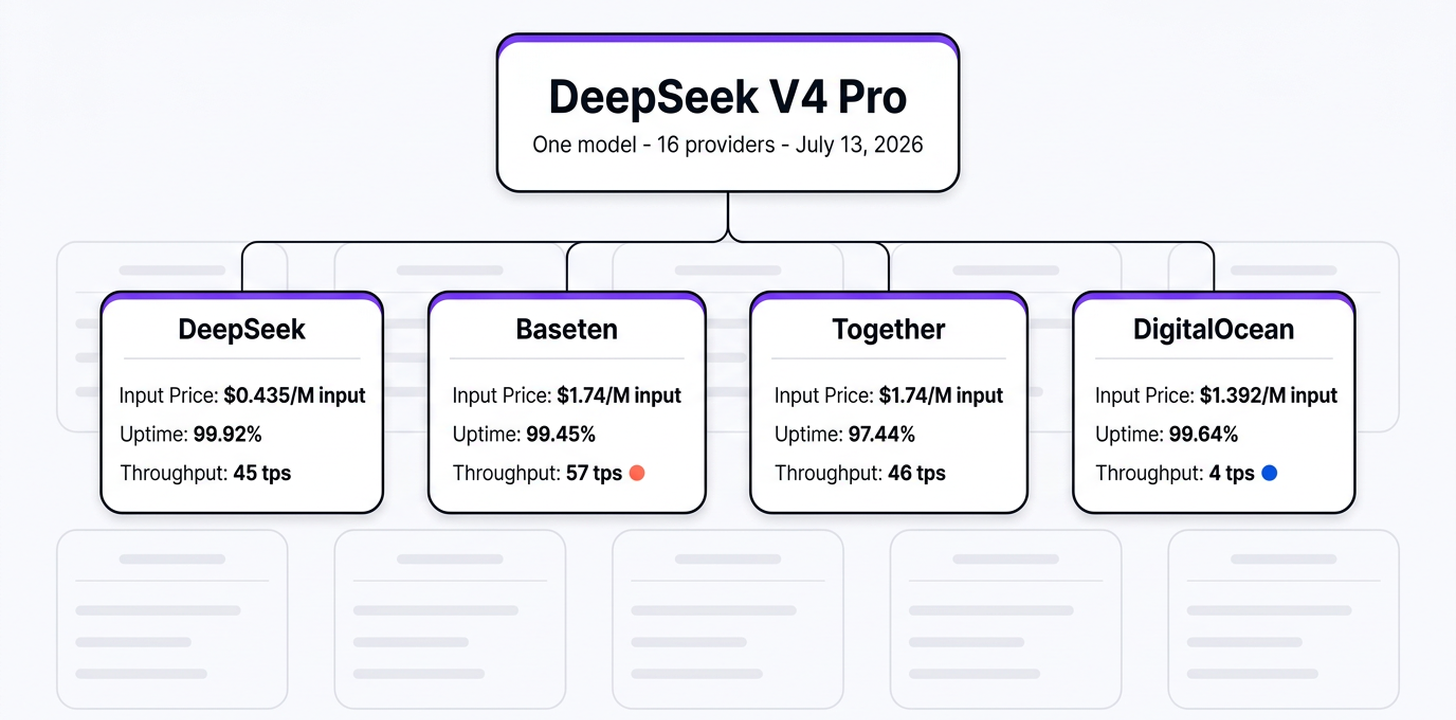
Here’s the live V4 Pro provider table, trimmed to the high and low ends. Prices move constantly, so click through for current numbers before you build anything on them.
| Provider | Input price /M | Uptime | Throughput |
|---|---|---|---|
| DeepSeek (cheapest input, highest uptime) | $0.435/M | 99.92% | 45 tps |
| Baseten (priciest input, fastest) | $1.74/M | 99.45% | 57 tps |
| Together (lowest uptime) | $1.74/M | 97.44% | 46 tps |
| DigitalOcean (slowest) | $1.392/M | 99.64% | 4 tps |
Input price ranges from about $0.44/M to $1.74/M for the same model weights, throughput from 4 to 57 tokens per second, and uptime from about 97% to nearly 100%. Go direct to one DeepSeek provider, and you’re picking one row of that table and living with it, good or bad. Route through OpenRouter, and you’re choosing among all of them under a single slug.
That spread can look like markup at first glance, but it isn’t. We don’t mark up provider pricing: the catalog price you see is what you pay. The 4x input-price spread is the actual difference in what those providers charge to run the same weights. That’s also why “is DeepSeek cheaper direct?” doesn’t have one answer: it depends entirely on which provider you’d be comparing against.
OpenRouter turns many providers into one reliable endpoint
By default, our routing layer deprioritizes any provider that has had a significant outage in the last 30 seconds, weights the stable ones by the inverse square of their price, and keeps the rest as fallbacks (see the provider-selection docs for the full mechanics). When a DeepSeek provider degrades, your request reroutes to another provider without you noticing.
Two separate things happen when a provider fails mid-request: routing retries through a fallback provider, and Zero Completion Insurance means you’re not charged when a response errors or comes back with zero output tokens.
Sort, cap, and pin DeepSeek providers
When you need tighter control, the provider object lets you tune speed, cost, and host selection in a single call:
| Control | What it does on a DeepSeek call |
|---|---|
sort: 'throughput' / :nitro | Routes to the fastest provider. Fixes “DeepSeek is slow.” |
sort: 'price' / :floor | Routes to the cheapest provider for the model. |
max_price | Hard cost cap. Fails the request rather than overspending. |
order / only / ignore | Force, restrict, or exclude specific DeepSeek providers. |
quantizations | Filters out poorly-quantized endpoints. Fixes quality complaints. |
Here’s a DeepSeek call that asks for speed but refuses to overpay for it. Treat the max_price values as placeholders; pull current numbers from the live model page before you ship.
from openrouter import OpenRouter

client = OpenRouter()

res = client.chat.send(
    model="deepseek/deepseek-v4-pro",
    messages=[{"role": "user", "content": "Write a SQL query to find duplicate rows."}],
    provider={"sort": "throughput", "max_price": {"prompt": 1, "completion": 2}},
)
import { OpenRouter } from '@openrouter/sdk';
const openRouter = new OpenRouter({ apiKey: process.env.OPENROUTER_API_KEY });
const res = await openRouter.chat.send({
model: 'deepseek/deepseek-v4-pro',
messages: [{ role: 'user', content: 'Write a SQL query to find duplicate rows.' }],
provider: { sort: 'throughput', max_price: { prompt: 1, completion: 2 } },
});That request serves DeepSeek V4 Pro from the fastest available provider, but won’t run at all if the price per token clears the cap you set. order, only, ignore, and quantizations follow the same pattern, for example provider: { only: ['baidu'], quantizations: ['fp8'] } to pin a specific provider running a specific quantization. Our guide on provider routing for cost walks through the cost-control fields in more depth.
Sticky routing, fallbacks, and Fusion lift a single model further
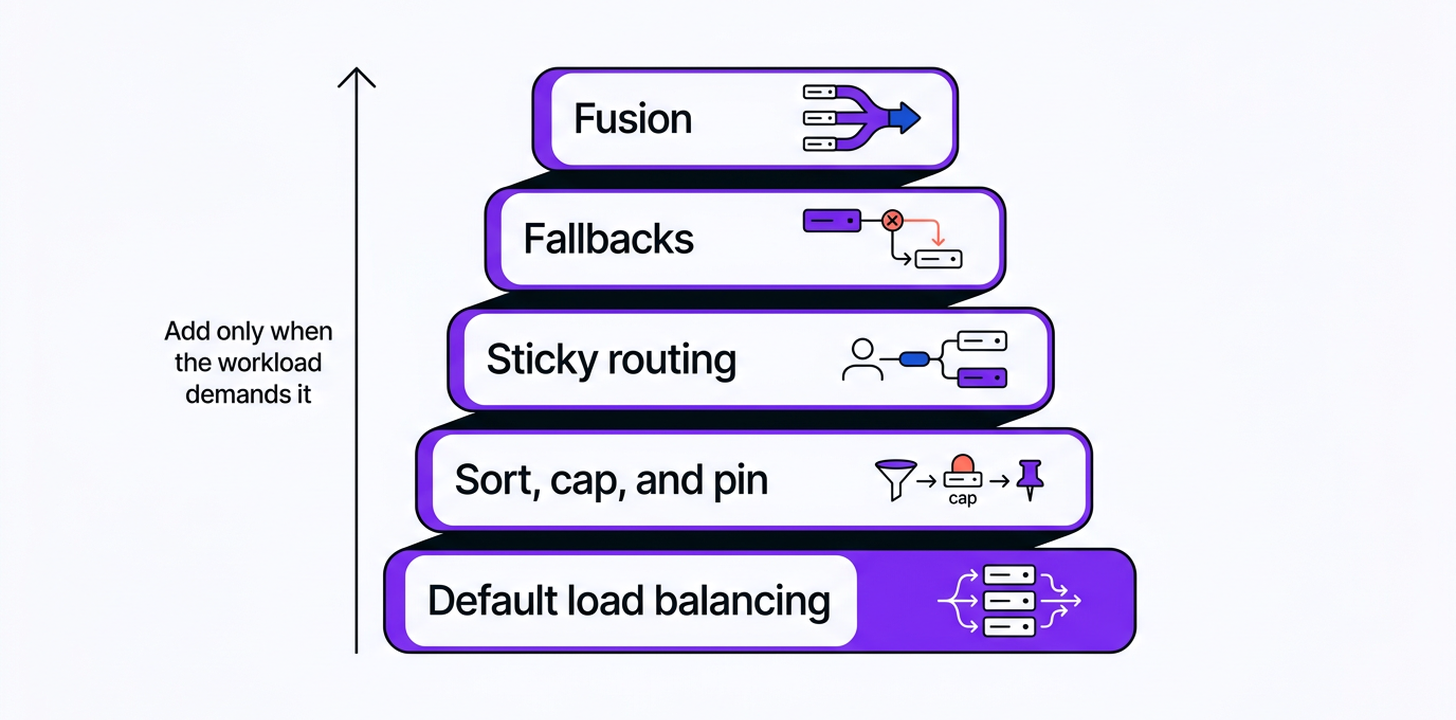
Sort, cap, and pin solve most single-request problems. Multi-turn agents need a bit more. Three additive layers cover them: sticky routing, fallbacks, and Fusion. They stack, and you add each one only when the workload actually demands it.
Sticky routing for multi-turn agents
Sticky routing pins the provider serving a conversation, so a DeepSeek agent doesn’t bounce between hosts mid-session. Without a session_id, we key the session by hashing the conversation’s opening messages, and the pin activates once a cache hit is detected. Pass a session_id (a top-level body field, or the x-session-id header) and the pin activates on the first successful request instead. If the pinned provider becomes unavailable, the request falls back to the next-best provider (full mechanics in the sticky routing docs).
A coding agent running a long refactor on V4 Pro can stay pinned to the same provider from the first turn through the end of the session. A tool-use loop that jumps from a fast provider to a slow one between turns gives you inconsistent latency and, worse, inconsistent behavior turn to turn. Our router guide covers stickiness across all of OpenRouter’s routers.
Fallbacks for long tool-use runs
A fallback array protects a long DeepSeek conversation from a single provider’s mid-run failure. Picture a support bot that runs a 5-step tool-use loop: look up the customer, check the order, draft a reply, run a policy check, then send. If the provider serving that conversation drops a response at step 3, the whole loop breaks. That’s the exact shape of a complaint we’ve seen on r/openrouter: persistent 400 errors on large tool-use conversations through one provider.
Two different fields handle this. models is an ordered array of model slugs; OpenRouter falls back to the next model if the primary is unavailable entirely. provider.order combined with allow_fallbacks: true governs provider-level fallbacks within a single model.
const res = await openRouter.chat.send({
  models: ['deepseek/deepseek-v4-pro', 'deepseek/deepseek-v4-flash'],
  messages: [{ role: 'user', content: 'Continue the agent loop.' }],
});
That call tries DeepSeek V4 Pro first and falls back to V4 Flash if the primary path fails, so one provider’s bad day doesn’t end your run.
Fusion when being wrong is expensive
Fusion runs a panel of models plus a judge to process harder questions with greater scrutiny. With its default 3-model panel, it runs at roughly 4 to 5 times the cost of a single completion, making it an exception, not the default. For a chat reply or a summarization endpoint, it’s usually unnecessary. For research, critique, or a high-stakes comparison task where you want DeepSeek’s cost profile but more confidence on the hard question, a panel that includes DeepSeek alongside a judge can be worth the multiple. Keep it scoped to the genuinely hard subtask.
When to call DeepSeek direct and when to route
The real complaints we see from the community on Reddit deserve straight answers. Developers have posted things like “Don’t use DeepSeek through OpenRouter” due to latency and cost, and have asked outright whether DeepSeek’s prices are lower. Both are fair questions. If your traffic is steady, single-provider, and latency-tolerant, going direct is simpler, and the extra hop plus the 5.5% pay-as-you-go fee can genuinely make it the cleaner choice.
| Go direct to DeepSeek when | Route through OpenRouter when |
|---|---|
| You hit one provider at steady volume and want the floor price | You want failover across many providers behind one slug |
| Your traffic is simple, single-turn, latency-tolerant | You run agents or long tool-use conversations that can’t drop |
| You don’t need to switch models or versions | You want to swap DeepSeek versions, or fall back to another model, by changing a string |
| You’d rather avoid any platform fee | Provider quality varies and you want to pin a known-good host |
Each complaint maps to a specific fix. “It’s slow” is a routing default, not a ceiling: set sort: 'throughput' or add the :nitro suffix. “Quality varies” is real, and the usual cause is quantization: filter with the quantizations field, or pin a provider you’ve tested with order or only. “It returns 400s on long runs” usually points to one provider in trouble: add a fallback array rather than relying on a single host.
What routing costs: a 5.5% pay-as-you-go platform fee on top of the no-markup provider rate. In exchange, you get failover across every DeepSeek provider, pay-only-for-success billing, provider pinning, and the ability to switch DeepSeek versions without touching your integration. For steady single-provider traffic, that 5.5% might not pay for itself. For anything agentic, or anything that genuinely can’t go down, it usually does.
Match the DeepSeek model to the job
Choose by family first: V4 for general agentic work, R1 for explicit step-by-step reasoning, and a distilled model when cost matters more than depth. Then confirm the current slug on the live DeepSeek hub rather than trusting a model name from a blog post, including this one, because the flagship moves and a frozen recommendation goes stale within weeks.
| Family | What it’s for | Example slug (check the hub for current) |
|---|---|---|
| Chat / V3 line | General-purpose chat and generation | deepseek/deepseek-chat, deepseek/deepseek-chat-v3-0324 |
| V3.1 / V3.2 line | Hybrid reasoning + tool use, efficiency-tuned | deepseek/deepseek-chat-v3.1, deepseek/deepseek-v3.2 |
| R1 reasoning line | Explicit step-by-step reasoning | deepseek/deepseek-r1, deepseek/deepseek-r1-0528 |
| Distilled small models | Cheap, fast, fit smaller budgets | deepseek/deepseek-r1-distill-llama-70b |
| V4 line | Newest large MoE, 1M-token context | deepseek/deepseek-v4-pro, deepseek/deepseek-v4-flash |
One capability worth remembering, though you should confirm it’s still current on the model page: as of this writing, the V3.2 and V4 models expose an optional reasoning toggle. Pass reasoning: { enabled: true } to turn on thinking mode and include the reasoning steps in the output, or leave it off for faster, cheaper non-reasoning responses on the same slug. The V4 models also accept reasoning_effort up to xhigh for maximum reasoning.
Call DeepSeek through OpenRouter in 5 minutes
If you don’t already have an OpenRouter account, sign up and create an API key from your dashboard. The OpenRouter API speaks the same OpenAI Chat Completions format you already know (see the quickstart), plus the Anthropic Messages and Responses API formats if that’s closer to your stack.
from openrouter import OpenRouter

client = OpenRouter()

res = client.chat.send(
    model="deepseek/deepseek-v4-pro",
    messages=[{"role": "user", "content": "Explain MoE routing in two sentences."}],
)
import { OpenRouter } from '@openrouter/sdk';
const openRouter = new OpenRouter({ apiKey: process.env.OPENROUTER_API_KEY });
const res = await openRouter.chat.send({
model: 'deepseek/deepseek-v4-pro',
messages: [{ role: 'user', content: 'Explain MoE routing in two sentences.' }],
});That’s a working DeepSeek call with default load balancing already active, meaning you’ve got provider failover before you’ve added a single routing field. Swap the slug for any model on the hub. If your goal is free DeepSeek access rather than production traffic, the free-tier path is covered in our free LLM APIs guide.
Frequently asked questions
Is DeepSeek cheaper direct or through OpenRouter?
It depends on which provider you compare us to, because we don’t mark up provider pricing. The catalog price is what you pay, plus a 5.5% platform fee on pay-as-you-go. Routing buys failover across every DeepSeek provider, version-switching, and pay-only-for-success billing, and that resilience usually outweighs the fee for agentic or uptime-sensitive workloads.
Should I use DeepSeek through OpenRouter or directly?
Route through OpenRouter unless your traffic only ever hits one steady, latency-tolerant provider, in which case going direct is simpler and can be cheaper per token. Route through OpenRouter when you want cross-provider uptime, provider pinning when quality varies, fallbacks for long tool-use runs, or the ability to switch DeepSeek versions without rewriting your integration.
Is DeepSeek quality consistent across providers?
Quality varies by provider, mainly because quantization differences across hosts can change the model’s responses. Use the quantizations field to filter out poorly quantized endpoints, order or only to pin a provider you’ve tested, and the per-provider benchmarks on the model page to compare before you commit.
How do I make DeepSeek more reliable on OpenRouter?
Default load balancing already deprioritizes any provider with a significant outage in the last 30 seconds. From there, add a fallback array, pin a known-good provider with order, and pass a session_id for sticky multi-turn conversations, per the sticky routing docs.
Why is DeepSeek slow or erroring on OpenRouter?
Two different problems with two different fixes. Slowness usually points to provider selection, not the model itself: start with sort: 'throughput' or the :nitro suffix. Errors on long tool-use runs are a separate issue: add a fallback array so the request can move to another provider instead of stopping on one that just failed.
Is DeepSeek free on OpenRouter?
Yes, with a caveat: “free” means specific free models within the DeepSeek lineup, typically marked with a :free slug suffix, available with rate limits, not unlimited usage of every DeepSeek model. For the full list of free options and current limits, see free LLM APIs.
Which DeepSeek version should I use?
Choose by family first: chat/V3 for general use, R1 for reasoning, distills for cost, the V-series for long context. Version numbers change faster than the families do. Then pick the specific current slug from the live DeepSeek hub based on context window, price, and recency, and use the rankings to see which version people actually use for each domain.